

A 2025 SR Analytics study found that 73% of enterprise GA4 implementations carry silent misconfigurations distorting 30 to 40% of the data they collect. Most teams discover the breakage about 30 days later, by which point Q1 campaign budgets have already been allocated against numbers that were never real. Independent research from Paramark has put the average misallocation cost at 18% of digital marketing spend.
That outcome is the byproduct of a decision most enterprises made in 2025, when the sunset deadline turned a measurement re-platforming question into a tactical migration project. Tag swap. Dual-tag period. Archive UA. Done.
That framing was efficient, and it met the deadline. It also produced what we now see across enterprise audits: GA4 properties that pass a surface-level functionality check but fail every analytical question more sophisticated than “how many sessions yesterday?”
This guide is for the analytics leads, IT directors, and CDOs running into that wall now. Having led GA4 implementations and re-implementations for retail, banking, and travel enterprises across MENA and the US, the pattern we see is consistent: the cost of treating GA4 as a tag swap is roughly 2 to 3 times the cost of treating it as measurement architecture from day one.
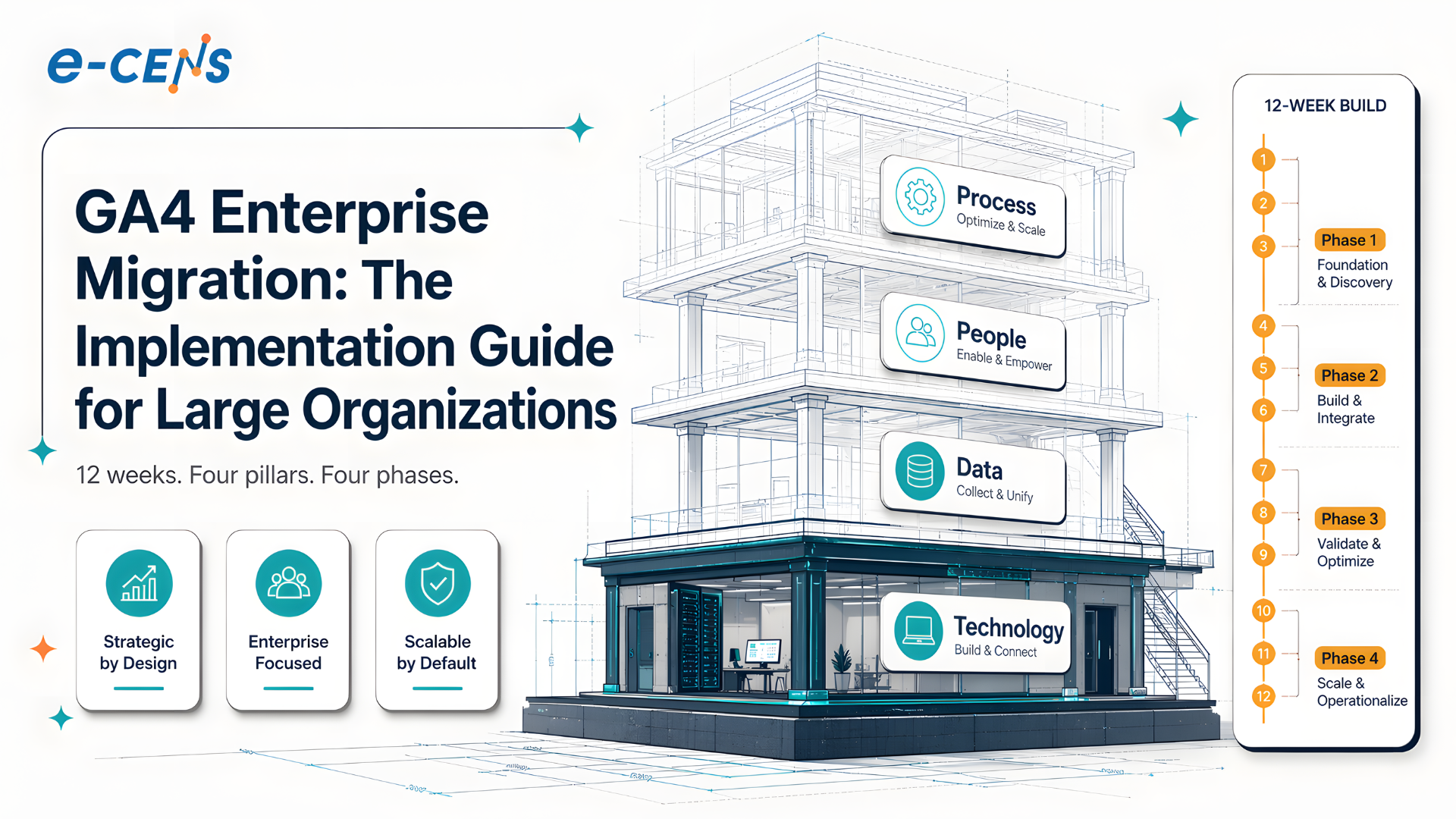
What follows is the 12-week framework we use, structured around four pillars: Technology, Data, People, and Process. It is not a beginner’s setup tutorial. It is the methodology we wish more teams had used in 2025.
The Sunset Migration Worked. So Why Does Your GA4 Feel Broken?
The sunset migration worked the way it was supposed to. By July 1, 2025, the vast majority of organizations running Universal Analytics had a functional GA4 property collecting data, dual-tagged for a parallel comparison window, with someone on the team able to log in and see real-time hits (DigitalApplied, 2025 reports 87% migrated). The deadline was met. The compliance box was checked.
Then the people who led that migration moved on to the next quarter. The marketing team kept reporting against the same KPIs. The dashboards Finance had been pulling for years now pulled from a different source under the hood, but the numbers were close enough that nobody asked questions. Right? Close enough was the bar.
Two years later, the questions have arrived. The first one usually comes from a finance director asking why the year-over-year revenue chart only shows fourteen months of data. The second comes from a marketer asking why the conversion path report is missing about a third of the touchpoints they expected. The third is the one that gets people fired: an executive asking why the channel attribution numbers in GA4 do not match what the ad platforms report back.
Each of those questions has a specific technical cause. They are not edge cases. They are the predictable output of treating GA4 as a tag swap.
The pattern is so consistent that it has become a category of work in its own right: the GA4 re-implementation. We see it in retail brands trying to model basket-level attribution and finding their add_to_cart events were never properly mapped to product-level parameters. We see it in financial services running GDPR audits and discovering Consent Mode was implemented in basic mode rather than advanced. We see it in travel companies building loyalty dashboards and finding the booking confirmation event fires twice on certain payment flows.

Why GA4 Migration Looked Like a Tactical Project
It is worth being fair to the people who ran those 2025 migrations. The framing as a tactical project was not foolish. It was structurally invited.
Google’s own communication treated the migration as a drop-in replacement. The official sunset documentation walked through Setup Assistant wizards and event-mapping wizards. Most consultancies publishing migration guides at the time produced checklists. A typical enterprise migration ran 4 to 6 weeks for moderate complexity and 2 to 3 months for complex multi-property deployments, framed as a scoped project with a clear endpoint (Scandiweb, 2024). That made budget approval easy and accountability simple.
The platform itself reinforced the framing. GA4 looked like Google Analytics. The login flow was the same. The interface used familiar terminology, with reports and segments and audiences in roughly the same places. For a marketing leader signing off on the migration, the work looked like a configuration exercise: install the new code, map the events, run dual-tagging, switch off the old property.
What that framing missed is that GA4 is not Universal Analytics with a new skin. It is a different measurement model, built on event-stream architecture rather than session-and-pageview architecture. The session, the bedrock unit of UA reporting, is now derived from events rather than recorded directly. Conversion attribution defaults to data-driven rather than last-click. Custom dimensions are scoped at the event level. The data model that powers BigQuery export is a flat, denormalized event table, not a session-organized log.
In other words, the migration was not a port. It was a re-platforming. And re-platformings have very different success criteria from ports.
That distinction is what the 2025 migrations skipped. Not because the people running them were careless, but because the work had already been priced and scoped as a port. By the time anyone realized otherwise, the dual-tagging window had closed, UA was archived, and the budget was spent.
The Hidden Costs Inside the GA4 You Already Migrated
The breakage shows up in four predictable places. Each one is a function of GA4’s defaults rather than a configuration mistake. Which is the part most teams find hardest to accept: the property is not “broken” in any conventional sense. It is collecting data exactly as designed. The defaults were just calibrated for properties one or two orders of magnitude smaller than yours.
Sampling kicks in at 10 million events
GA4’s standard reports are unsampled. That is the part Google emphasizes, and it is true. The Explorations workspace, where enterprise analysts spend most of their time, samples any query that exceeds 10 million events at the property level (Google Analytics Help). GA4 360 raises that ceiling to 1 billion events per query.
For a retail enterprise running 50 to 100 million monthly events, every cohort analysis, every funnel longer than a week, and every cross-property comparison comes back sampled. The interface flags it with a small icon that most analysts learn to ignore after the third week. They learn to ignore it because the alternative is no analysis at all.GA4 Standard vs 360: where the limits sitGA4 STANDARDGA4 360Exploration sampling at10M eventsExploration sampling at1B events100x ceilingBigQuery export cap1M / dayBigQuery export cap20B / day20,000x ceilingSource: Google Analytics Help, 2024
Cardinality silently rolls dimensions into “(other)”
Any dimension with more than 500 unique daily values is classified as high-cardinality and rolled into a synthetic (other) row in standard reports (Google Analytics Help). Page URL on a content site. Product SKU on a retail site. Search query parameter on any site with internal search. All routinely cross 500 unique values per day at enterprise scale.
The result is that the most analytically valuable dimensions are the ones GA4 silently aggregates first. A merchandiser asking “which SKU drove the most add-to-cart events last week” looks at a report where the top SKUs are listed by name and the next 80% of revenue sits in a single (other) bucket. Without BigQuery export, that information is gone.
Default data retention is two months
GA4 ships with user and event data retention set to 2 months. That is true for both Standard and 360 properties (Google Analytics Help). The maximum on Standard is 14 months for user data. On 360, event data can be retained up to 50 months.
The default is retroactive. If your 2025 implementation used the default and nobody changed it, you do not have access to event-level data older than 2 months from any date you query. The historical dataset that feels like it should exist in GA4 simply does not. You can change the setting going forward, but you cannot recover what has already been purged. (We have written about the recovery options for properties caught in this situation in our GA4 delete and restore guide.)
“But our reports look fine.”
This is the question we hear most often when an enterprise engages us for a GA4 audit. The reports look fine. The numbers move week to week in patterns that make intuitive sense. There is no error message anywhere in the interface.
That sense of “fine” is itself a misleading signal. Standard reports look fine because they query the unsampled, pre-aggregated tables GA4 maintains for the most common report types. The misconfigurations only become visible the moment an analyst opens an Exploration past the 10M event threshold, breaks a dimension down past the 500-cardinality limit, or asks a year-over-year question past the retention horizon. The reports that look fine are the ones that have never asked a question hard enough to fail.
Reframe: GA4 Migration Is a Measurement Architecture Decision

The reframe required is small in language but large in consequence. GA4 migration is not a tag swap project. It is a measurement architecture decision that happens to involve tag implementation.
That distinction matters because the work, the team, the timeline, and the deliverables all change. A tag swap is a project for a marketing operations specialist plus a developer for two weeks. A measurement architecture decision is a project for a cross-functional team running a structured engagement over several months, with stakeholders from analytics, IT, legal, and the business units that will consume the data.In our experience, enterprises that engage us for re-implementation after a tactical 2025 migration spend roughly 2 to 3 times what a clean architectural implementation would have cost the first time. The premium is not the technical work, which is comparable. The premium is the audit-and-rip-out cost: documenting what the prior implementation actually did, identifying what to preserve versus rebuild, coordinating change across the dashboards and downstream systems that depend on the existing schema, and absorbing the productivity loss while the analytics team operates without trustworthy data. None of that exists when the architecture is correct from day one.
The framework we use applies the four pillars we apply across all measurement engagements:
- Technology is the tag manager configuration, the GA4 property structure, the BigQuery linkage, and the server-side measurement layer.
- Data is the event taxonomy, the custom dimension and metric design, the consent state model, and the schema documentation.
- People is the RACI for ownership, the analyst training, the executive enablement, and the vendor partnerships that anchor the engagement.
- Process is the governance cadence, the change management protocol, the QA discipline, and the continuous validation rhythm.
A tactical migration touches only the first pillar, and only at its surface. A measurement re-platforming touches all four, in the order shown.

The 12-Week Enterprise GA4 Migration Framework
Twelve weeks is the working timeline for a clean enterprise GA4 implementation or re-implementation that follows the four-pillar architecture. It is the structure we use across our GMP-certified delivery engagements, calibrated against the actual time required to align stakeholders, configure the technical infrastructure, validate data quality, and hand off operational ownership without the productivity cliff that follows under-scoped projects.
Twelve weeks splits into four three-week phases, mapping to the four pillars. Each phase has a defined deliverable and a defined exit criterion before the next phase begins.
Phase 1: Architecture (Weeks 1–3)
The first three weeks make architectural decisions, not configuration. The team maps the stakeholder set, documents the existing measurement state, and locks four decisions that constrain everything downstream.
The first is the property and sub-property structure. GA4 360 supports up to 400 sub-properties per source and up to 200 source properties in a roll-up structure (Google Analytics Help). For multi-brand or multi-region enterprises, this determines whether business units have their own filtered view of the data or have to negotiate access to a shared property.
The second is the BigQuery linkage. Standard GA4 caps the daily export at 1 million events. GA4 360 raises that to 20 billion events per day (Google Analytics Help). For any enterprise above the 1M/day threshold, this decision determines whether you have a queryable historical record at all.
The third is the server-side measurement plan: which streams move to a server-side container, what the cookie strategy is, how consent state propagates between client and server. The fourth is the consent architecture itself: Consent Mode v2 has been mandatory for European advertisers since March 2024 (Cookiebot, 2024), and the choice between basic and advanced mode has direct implications for both compliance posture and data fidelity.
“Isn’t 12 weeks too long? Google said 8.”
Google’s 8-week guidance was for sunset compliance. It assumed you accepted the defaults: 2-month retention, no BigQuery export, no server-side measurement, no sub-property structure. A 12-week framework is what it costs to build defaults that will not break the moment you scale.
Phase 2: Implementation (Weeks 4–7)
Implementation is where the architectural decisions become a configured property. Custom dimensions and metrics get instrumented. The server-side container goes live. Consent Mode v2 ships with the cookie banner aligned to the consent signals GA4 expects. (We have written a detailed implementation guide for server-side tracking that covers the technical depth in full.)
This phase is also where the dual-tagging window opens. Even on a re-implementation with no UA to dual-tag against, we run a parallel implementation where the new architecture sits alongside the existing GA4 property for a 4 to 6 week comparison window before cutover.
The server-side measurement work is where most of the data quality lift happens. A Stape benchmark on a representative implementation showed PageSpeed scores rising from 56 to 95 after moving the heaviest tags from client-side to server-side (Stape, 2024). On the conversion side, a separate Stape case study reported an 88% lift in measured conversion-based campaigns after sending offline and cross-sell data through the server-side container.PageSpeed score after server-side GTM migration0255075100Before56After95Source: Stape benchmark, 2024
There is also the ITP and ad-blocker dimension. Safari’s Intelligent Tracking Prevention limits first-party JavaScript cookies to 7 days of inactivity, and 24 hours if the user lands via a tracking parameter (Snowplow, 2024). Server-side measurement is the only architecturally clean route around that constraint, because cookies are written via Set-Cookie headers from the first-party domain rather than via document.cookie from the browser.
For analytics teams making the case for server-side measurement to a skeptical IT director, Simo Ahava’s MeasureSummit 2024 talk on data stream consolidation is the most-cited reference:Simo Ahava on data stream consolidation with server-side tagging (MeasureSummit 2024).

Phase 3: Governance (Weeks 8–10)
Governance is the phase that gets cut from tactical migrations and reinstated, expensively, when the first audit finding lands. Three weeks is enough to ship four governance components.
The first is data retention. The GA4 default of 2 months sits below most enterprise audit horizons. The retention policy needs to be documented (with a stated business justification for 14 months on Standard or up to 50 months on 360 event data), implemented in the property settings, and propagated to the BigQuery dataset rules. For the broader discipline this fits inside, see our piece on enterprise data governance practices.
GA4 data retention: default vs maximum (months)01020304050214GA4 Standard250GA4 360DefaultMaximumSource: Google Analytics Help, 2024
The second is naming conventions and event taxonomy documentation, owned in a single source of truth that the analyst team and the product engineering team both reference before shipping any new event. The third is the RACI for ownership: who approves new dimensions, who certifies dashboards as production-grade, who owns the relationship with each downstream data consumer. The fourth is the monitoring stack: anomaly detection on event volumes, validation rules on critical events, and a defined escalation path when those alerts fire.
The compliance pressure is real. Cumulative GDPR fines crossed €5.88 billion by January 2025, with 2,245 individual enforcement actions recorded (CMS GDPR Enforcement Tracker, 2025). A meaningful share of those involved analytics misconfiguration, particularly around consent signals and data retention.
“Can’t we add BigQuery later?”
BigQuery export only captures forward, never backward. Every month you delay the linkage is a month of analytical archaeology you can never recover. For an enterprise that took 18 months to get around to BigQuery, that is 18 months of conversion-path data that exists nowhere queryable. The configuration takes 30 minutes. The consequences of delaying it last for years.
Phase 4: Activation (Weeks 11–12)
The final two weeks make sure the implementation does not decay the moment the engagement ends. Dashboards get handed off. Stakeholder enablement sessions run. The validation cadence gets booked into the analytics team’s calendar (monthly for the first six months, quarterly after that). The vendor partnership is defined: who is on call when the property breaks, who reviews quarterly schema changes, who certifies new dimensions before they ship.
Activation is also where the soft success criteria get measured. Are the dashboards being used by the people they were built for? Are media decisions changing because of the new attribution data? Is the product team asking better questions of the funnel data than they were 12 weeks ago? Those are the indicators that the implementation is generating return rather than sitting as an underused asset.
What Enterprise-Grade GA4 Actually Looks Like
After a re-platforming engagement, the property looks different in ways an executive would notice.
The dashboards run against BigQuery rather than the GA4 interface, which means they answer questions that would have been blocked by sampling, retention, or cardinality limits. The marketing team can model multi-touch attribution across a 90-day window without losing data fidelity. The merchandising team can rank SKUs by add-to-cart velocity without 80% of the catalogue collapsing into (other). The CFO can pull a true 24-month year-over-year comparison.
The implementation has documented owners. There is a named individual responsible for each event in the taxonomy, each custom dimension, each consumer dashboard. When an analyst proposes a new event, the approval flow takes hours rather than weeks. When something breaks, the alert reaches the right person before the marketing director notices the dashboard looks wrong.
The compliance posture is defensible. Consent Mode v2 is implemented in advanced mode. Data retention is documented and justified. The DPA is in place. When the legal team gets a regulator inquiry, the response takes a week of evidence-gathering rather than a quarter of forensic reconstruction.
Most importantly, the implementation behaves like infrastructure rather than like a project. The questions the business asks of it are answerable. The team that operates it is staffed and trained. The governance cadence runs whether anyone is paying attention or not. That is the version of GA4 the enterprise was supposed to get in 2025.

From Tag Swap to Measurement Architecture
The decision to migrate to GA4 was made in 2025. The decision still on the table is what to do about the migration that already happened.
For most enterprises, the honest answer is that the property collecting data right now is not the property the business needs. Not because it is broken in any sense the GA4 interface would flag, but because the defaults it accepts are calibrated for a different scale of organization. Standard reports look fine. Explorations sample. BigQuery is empty. Retention is two months. The cost of that gap runs 2 to 3 times the cost of building the architecture correctly the first time, and it compounds every quarter the gap stays open.
The good news is that the work is scoped and the methodology is well-understood. Twelve weeks. Four pillars. Four phases. The deliverables are concrete and the success criteria are measurable. The harder part is treating the work as the architectural decision it is, rather than the configuration exercise it has historically been packaged as.
If you are weighing a GA4 re-implementation, an audit of what you have, or a fresh enterprise migration on a 2026 timeline, our team has run this framework across retail, banking, and travel deployments in MENA and the US.

Frequently Asked QuestionWhat is GA4 enterprise migration?
GA4 enterprise migration is the structured process of implementing or re-implementing Google Analytics 4 at an organization with complex multi-property requirements, high event volumes, or strict data governance obligations. It differs from a tactical migration in that it treats the work as a measurement architecture decision rather than a tag swap, encompassing property structure design, BigQuery integration, server-side measurement, consent infrastructure, and operational governance. Enterprise migrations typically run as a 12-week engagement structured around four pillars: Technology, Data, People, and Process.
How long does an enterprise GA4 migration take?
A clean enterprise GA4 migration or re-implementation takes 12 weeks structured into four three-week phases: Architecture, Implementation, Governance, and Activation. Tactical sunset migrations completed in 4 to 6 weeks in 2025 typically cost 2 to 3 times more to remediate than a properly scoped re-implementation. The 12-week timeline accounts for stakeholder alignment, dual-tagging or parallel-implementation validation, and the operational handoff that prevents the implementation from decaying after launch.
Do I need GA4 360 for enterprise migration?
GA4 360 becomes necessary at the point where Standard property limits start producing analytical loss. The most common triggers are exceeding 10 million events per Exploration query (which forces sampling), needing more than 1 million events per day exported to BigQuery, or requiring sub-property structures for business units. GA4 360 retail pricing starts at approximately $50,000 per year, with multi-region enterprise contracts commonly reaching $150,000 per year. For organizations below those thresholds, a well-architected Standard property with BigQuery export and server-side measurement frequently outperforms a poorly architected 360 property.
What is included in a GA4 migration checklist?
A defensible GA4 migration checklist covers four domains, not one. The technical domain includes property and sub-property structure, BigQuery linkage, server-side container configuration, and Consent Mode v2 implementation. The data domain includes event taxonomy, custom dimension and metric design, and naming conventions. The people domain includes RACI documentation, analyst training, and executive enablement. The process domain includes data retention policy, monitoring and alerting, governance cadence, and a defined ownership model. Checklists that cover only the technical domain produce the silent misconfigurations that surface 12 to 18 months later as audit findings.
How much do GA4 migration services cost?
GA4 migration services for enterprise organizations typically range from $30,000 to $150,000 depending on scope, the number of properties, the existing implementation state, and whether the engagement includes BigQuery integration and server-side measurement. Re-implementation engagements for properties migrated tactically in 2025 commonly run 2 to 3 times the cost of a clean first-time implementation, due to the audit-and-rebuild premium. Forrester’s 2024 budget data shows 69% of data and analytics decision-makers increasing investment in this category, reflecting the scale of remediation work currently underway (Forrester / Analytic Partners TEI, 2024).


