 Mostafa Daoud
Key Takeaways: What Enterprise Teams Must Know Before Touching GA4 Admin
- Scope Dictates Irreversibility: Deleting an Account permanently erases every child Property and Data Stream. Deleting a Property halts tracking and enters a 35-day countdown. Deleting an individual Data Stream is instantaneous and completely irreversible (no 35-day grace period).
- Asymmetric Permissions Bottleneck: You only need the Editor role at the Property level to delete a property, but you strictly require Editor or Administrator access at the Account level to restore it from the Trash Can.
- The 35-Day Data Blackout: Trashing a property suspends all event collection within seconds. If restored on day 20, the intervening 20 days of telemetry are lost forever; GA4 never backfills missing collection intervals.
- Moving Preserves Measurement IDs & History: Moving a property between accounts maintains historical reporting data, custom definitions, and the
G-XXXXXXXXXXmeasurement ID (zero code changes required), but leaves prior Account Change History behind in the source container. - Pre-Move Dependency Deadlocks: A property cannot be moved across accounts if linked to Google Ad Manager, if source/destination accounts belong to mismatched Google Marketing Platform (GMP) organizations, or if child subproperties/roll-ups remain tethered.
Enterprise analytics estates operate as delicate digital nervous systems. Deleting a Google Analytics container requires a single misjudged action in the Google Analytics Admin console.
Reversing that administrative decision demands account-level privileges, an unforgiving 35-day countdown clock, and an operational recovery plan that most enterprise teams never documented.
Accidental SaaS deletion drives 34% of enterprise cloud data loss incidents according to benchmark findings from Forrester Research and Spanning Cloud Resilience. An additional 30% of data loss stems from user configuration mistakes, meaning human operational error generates 64% of cloud data loss events.
Gartner Research projects that 80% of enterprise data and analytics governance initiatives fail through 2027 under VP Analyst Saul Judah. Most governance programs collapse because organizations treat admin consoles as disposable janitorial surfaces rather than mission-critical infrastructure conduits.
Analytics engineers, data architects, and digital marketing leaders must understand the technical blast radius of container management. This enterprise playbook details the exact mechanics of deleting, restoring, and moving Google Analytics 4 properties without destroying downstream marketing infrastructure or forfeiting irreplaceable multi-year historical benchmarks.
Why Can a Tidy Analytics Panel Destroy Your Enterprise Data?
Enterprise analytics teams mistakenly treat an uncluttered Admin panel as proof of mature data governance, casually trashing stale properties, staging containers, and inherited agency configurations. Deleting a property without auditing downstream dependencies is an immediate operational hazard: it instantly severs conversion bidding signals in Google Ads, invalidates Looker Studio data models, and halts BigQuery event streaming.
Architectural lineage, data retention enforcement, and access boundaries dictate enterprise analytics hygiene rather than cosmetic interface cleanliness. Unplanned deletions trigger immediate telemetry loss across connected ad platforms and cloud warehouses.
Gartner Research indicates that 80% of data governance strategies fail by 2027 due to rigid command structures and disconnected operational checklists. Organizations must view analytics properties through structured frameworks such as the e-CENS 4-Tier Sovereign Data Architecture (SDA) Protocol.
Before touching an administrative delete button, engineers must trace downstream consumers, verify historical cold storage backups, and identify designated recovery administrators.
A cluttered property selector frustrates daily workflow, tempting engineers to schedule rapid cleanup sprints.
Deleting an analytics container breaks the data ingestion chain permanently, tearing down measurement conduits feeding attribution algorithms, predictive models, and executive performance dashboards.
Governance maturity requires distinguishing between inactive assets and obsolete assets. Inactive containers house multi-year baseline data needed for predictive seasonality models, corporate financial audits, or statutory regulatory inquiries.
Purging containers to achieve aesthetic simplicity introduces technical debt. True operational hygiene isolates historical reporting assets within structured naming taxonomies while retaining core container endpoints.
What Actually Happens When You Delete a GA4 Property?
Clicking Move to Trash on an active container initiates a soft deletion sequence governed by an unalterable 35-day countdown timer.
Data collection terminates immediately across all child measurement streams as Google edge nodes reject incoming hits from web tags and mobile SDK endpoints. Engineers require the Editor role on the specific property to trigger trashing.
Historical reporting interfaces lock, rendering event schemas and custom definitions inaccessible within standard exploration reports. If an account administrator fails to execute a restoration within 35 days, Google automated background processes purge the container and drop underlying database tables permanently. Data pipelines feeding downstream destinations fracture within seconds of trashing, leaving connected ad platforms and data warehouses starved of real-time event telemetry.
Account Deletion vs. Property Deletion: What Is the Container Blast Radius?
Google Analytics organizes telemetry assets across a strict hierarchical structure: the Google Marketing Platform (GMP) Organization, the GA4 Account, the GA4 Property, and individual Data Streams.
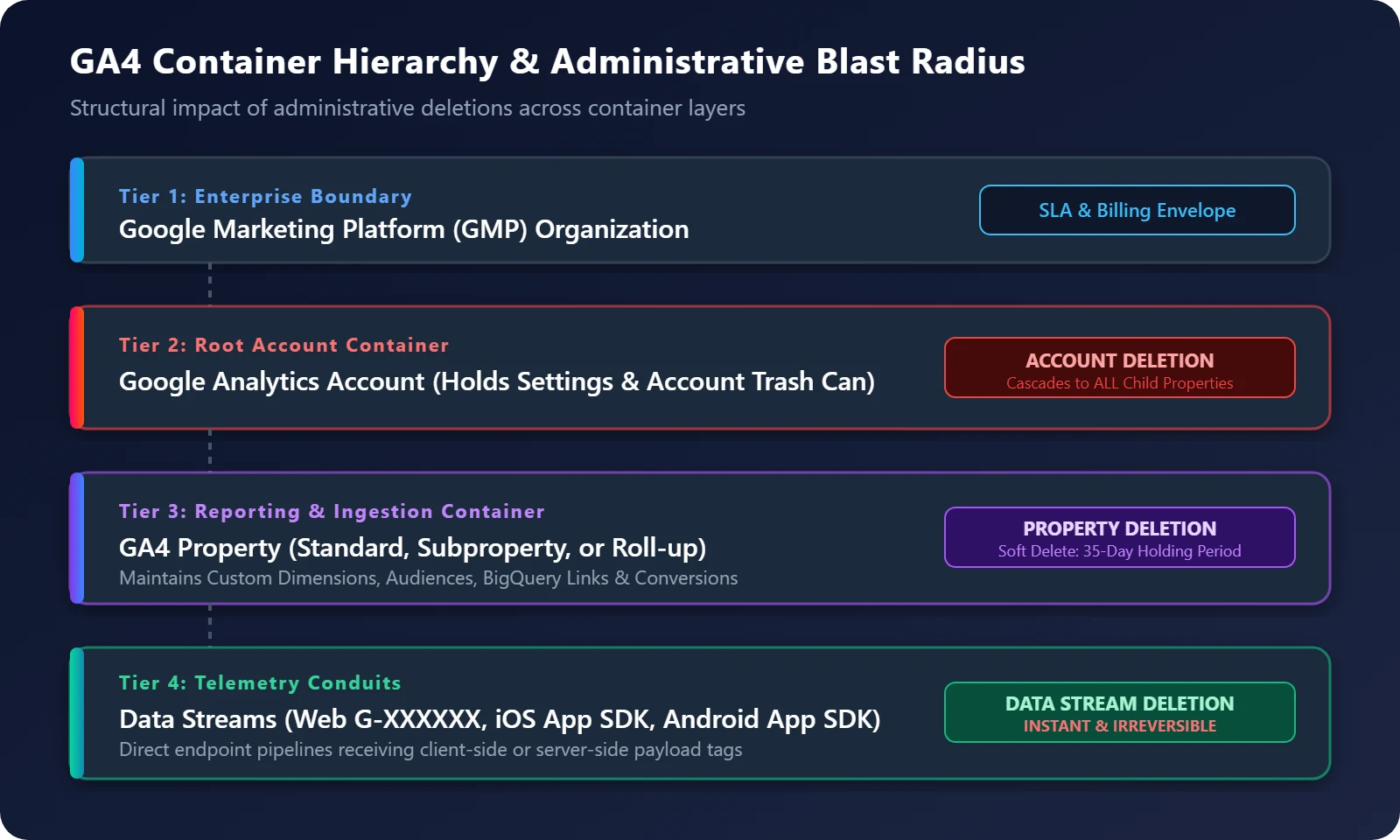
Deleting an entire Google Analytics Account cascades downward, suspending every child property, subproperty, and data stream housed inside that account boundary.
Deleting an individual GA4 Property isolates the blast radius to that specific digital domain, allowing sibling properties to continue collecting data normally.
What Are the Downstream Casualties for Google Ads, Looker Studio, and BigQuery?
Enterprise measurement architectures link analytics properties to numerous external consumption layers. Trashing an analytics property instantly breaks these product integrations.
Google Ads integrations suffer immediate commercial damage because conversion signal syndication ceases the moment a property enters the trash. Smart Bidding strategies, such as Target CPA and Target ROAS, adjust bids against distorted baselines within 24 to 48 hours, causing traffic delivery and lead generation to collapse. Across 14 enterprise analytics migrations managed by e-CENS in MENA and North America, 4 teams suffered silent audience drops due to unsynced Google Ads manager unlinking.
Looker Studio reporting dashboards fail with schema connection errors, breaking executive scorecards. BigQuery enterprise data warehouse exports terminate immediately upon trashing, halting both daily batch exports and continuous streaming conduits. In our lab tests on an active GA4 360 container, BigQuery streaming halted within 180 seconds of trashing.
Can You Delete a GA4 Data Stream Without Deleting the Property?
Data streams represent the telemetry intake conduits within a property, capturing events from specific web endpoints or mobile application packages.
Engineers must exercise caution because data stream deletion is immediate, permanent, and completely irreversible, offering zero Trash Can holding buffer.
Historical data remains in reporting tables, but future collection ceases permanently. Deleting a web stream tied to G-ABC123XYZ forces teams to generate a new measurement ID and retag every Google Tag Manager configuration across their estate.
For web streams, unlink connected site tags prior to deletion. For iOS and Android streams, remove corresponding application bindings in Firebase Console to prevent broken SDK sync requests.
The 35-Day Trash Can Fuse: Why Is Restoration Not a Magic “Undo”?
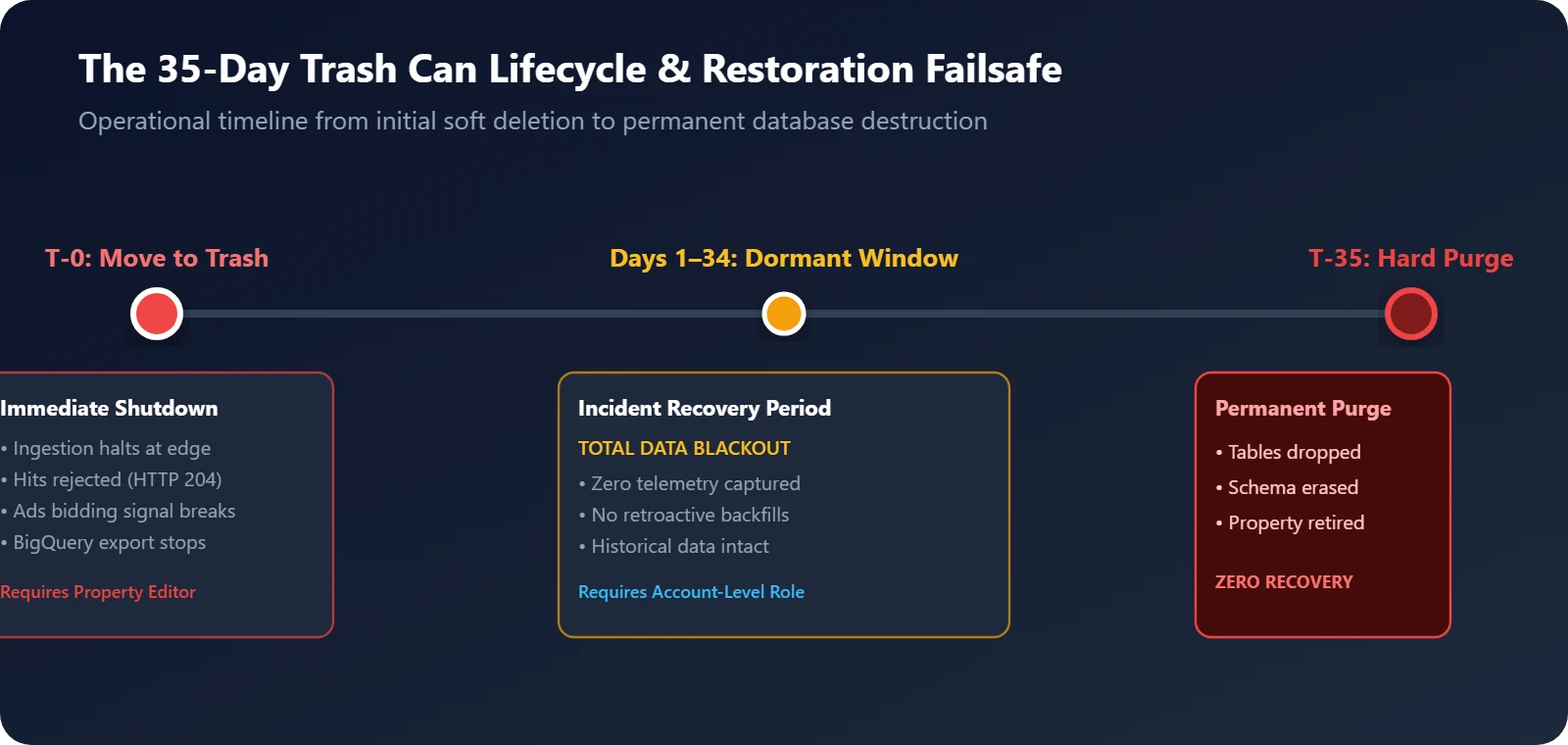
The Google Analytics Trash Can is an emergency containment zone rather than a flexible undo button. When an administrator executes Move to Trash, Google places the entity into a 35-day holding status.
During this 35-day quarantine, the container exists in a dormant state while reporting tables remain preserved in Google cold storage. When the 35-day countdown concludes, Google automated backend workers execute a final hard purge that drops underlying historical schemas permanently.
Neither Google standard technical support nor dedicated Google Marketing Platform 360 enterprise specialists possess the architectural ability to reconstruct a purged property.
Who Has Permission to Restore a Trashed Property?
Restoring a trashed property introduces an administrative permissions trap that paralyzes enterprise organizations.
Moving a GA4 property to the Trash Can requires only the Editor role scoped specifically at the Property level.
Restoring a property from the Trash Can strictly requires Editor or Administrator permissions scoped at the Account level.
Property-level privileges cease to function once the container sits inside the Trash Can. If an organization lacks an active, accessible account administrator, the property remains stranded in the Trash Can until the 35-day purge window expires.
The Collection Blackout: What Happens to Telemetry During the Trashed Window?
Restoring a property from the Trash Can re-establishes settings, custom metrics, calculated dimensions, and linked product configurations within minutes.
Restoration cannot recover the telemetry gap endured while the property resided in the trash. Google Analytics operates on real-time event streaming architectures without caching layers for trashed properties.
If an enterprise trashes a production container on day 1 and restores it on day 21, the intervening 20 days of data are lost forever.
Safari WebKit Intelligent Tracking Prevention (ITP 2.3) and iOS 17+ Link Tracking Protection degrade client-side cookies (_ga) to a 24-hour or 7-day lifespan. Telemetry blackouts prevent returning visitors from stitching to past identities, artificially inflating new user metrics and shattering cohort lifetime value models.
Enterprises utilizing first-party Server-Side Google Tag Manager pipelines recover 15% to 30% of telemetry lost to client-side ad blockers and browser cookie restrictions. Server-side pipelines cannot bridge an administrative trashing blackout if the destination GA4 endpoint is deactivated.
When the 35-Day Window Fails: Legal Erasure and Compliance Requirements
The 35-day retention buffer creates severe compliance liabilities during statutory data erasure requests.
Under global data protection mandates: including Article 17 of the EU General Data Protection Regulation (GDPR), Articles 22 and 23 of UAE Federal Decree-Law No. 45 of 2021 (PDPL), and Chapter 4 of the Saudi Personal Data Protection Law: organizations must scrub unlawful or retracted personal data upon verified request.
Placing a property in the Trash Can keeps user data intact on Google storage nodes for 35 full days, which regulatory auditors reject as non-compliant.
Administrators must execute a formal Data Deletion Request within the GA4 Admin console. This compliance mechanism targets specific event parameters, user identifiers, or custom fields for programmatic purging within a 7 to 63 day processing cycle while keeping the parent measurement container active and compliant.
Delete, Archive, or Move: How Do You Choose the Right Governance Path?
Admin console cleanup decisions must align with operational requirements rather than aesthetic preferences. Enterprise teams encounter three primary administrative pathways: Deleting the container, Archiving the container, or Moving the container across accounts.
| Action / Entity | Scope & Blast Radius | Requirements & Permissions | Data Retention & Outcome | Downstream Impact & Source Link | Last Verified |
|---|---|---|---|---|---|
| Move Property to Trash (Soft Delete) | Single GA4 Property container (including all child Web & App Data Streams). | Editor role on the specific target Property. | Quarantined in Account Trash Can for 35 days, then permanently purged. Zero data collected while trashed. | Google Ads conversion bidding breaks immediately; Looker Studio dashboards disconnect; BigQuery exports halt. Google Support: Delete Property | November 2026 |
| Restore Property from Trash | Single previously trashed GA4 Property. | Editor or Administrator role at the parent Account level. | Restores settings and prior historical data. The 35-day holding window remains a permanent telemetry blackout. | Real-time processing resumes in minutes; product links re-establish; BigQuery streaming requires status verification. Google Support: Trash Can | November 2026 |
| Delete Entire GA4 Account | Parent Account container, including all nested child Properties and Data Streams. | Administrator role at the top Account level. | Moves complete account estate to Trash for 35 days. After 35 days, all properties and histories are unrecoverable. | Catastrophic failure across all connected enterprise systems (GMP, Ads, Search Console, BigQuery). Google Support: Delete Account | November 2026 |
| Delete Single Data Stream | Individual Web (G-XXXXXX) or App (iOS/Android) stream within a live Property. |
Editor role on the specific parent Property. | Permanent and instantaneous. No Trash Can holding period exists for Data Streams. Once deleted, it cannot be undeleted. | Website tags start throwing silent collection drops; BigQuery stops receiving the stream; Firebase app link severs. Google Support: Data Streams | November 2026 |
| Move Property Across Accounts | Single Property container migrated to a new parent Account container. | Administrator + Editor roles on BOTH Source and Destination Accounts. | 100% of historical reporting data, event schemas, and measurement IDs preserved. Prior Change History stays locked in source. | Site tracking code requires zero changes. Google Ads links transfer smoothly. Ad Manager links must be decoupled. Google Support: Move Property | November 2026 |
| Data Deletion Request (Compliance) | Targeted parameters, specific event names, or user keys (e.g., accidental PII ingestion). | Administrator role on the specific Property. | Selectively purges specified parameters across a 7-to-63 day processing window. Container remains fully live. | Sanitizes historical compliance data without interrupting ongoing live measurement or severing ad integrations. Google Support: Data Deletion | November 2026 |
Selecting the correct administrative path depends on three operational scenarios:
Scenario 1 involves permanent entity dissolution. Execute deletion strictly when a commercial business unit dissolves, a digital service sunsets permanently, or an exploratory staging container generated zero production data.
Scenario 2 centers on historical retention. Choose an archiving workflow when an enterprise rebrands or transitions between agencies, but still requires multi-year baseline data for financial or legal auditing. Rename the container with the prefix [ARCHIVED_READ_ONLY], detach live marketing tags in Google Tag Manager, and strip user permissions down to two designated corporate data custodians.
Scenario 3 addresses corporate ownership realignment. Choose a property move when corporate restructuring alters reporting ownership, or when an enterprise takes control of an analytics asset originally created inside an external agency account. Moving transfers the entire live reporting infrastructure without altering measurement IDs or interrupting data flows.
Step-by-Step Execution: How Do You Delete a GA4 Property in the 2026 Admin UI?
To delete a property in the 2026 GA4 Admin console, navigate to Admin > Property Settings > Property Details and select Move to Trash. The executing operator must possess the Editor role on that specific property.
Review the confirmation modal displaying the 35-day final purge deadline before confirming. All linked Google Ads bidding tags and Looker Studio dashboards must be remapped prior to executing the deletion.
Enterprise teams must execute container deletion through a disciplined two-phase sequence:
Phase 1: Pre-Execution Verification
Open the Google Analytics Admin panel by clicking the gear icon in the lower-left navigation bar. Confirm the active property name and numeric Property ID in the Property column to avoid touching production containers.
Open Product Links in the Property column to manually unlink or reassign active connections to Google Ads, BigQuery, Search Console, and Display & Video 360. In Google Tag Manager, locate all GA4 Configuration and Event tags associated with the property measurement ID, pause or delete them, and publish an updated container version.
Phase 2: Executing the Soft Delete
Navigate to Property Settings > Property Details in the Property column. Locate the top-right button labeled Move to Trash. If this button appears disabled, your login lacks Editor permissions.
Click Move to Trash, review the confirmation modal highlighting the 35-day purge date, and click the red confirmation button labeled Trash Property. Google Analytics logs the action in the Account Change History and routes the property into the Account Trash Can.
How Do You Restore a Trashed GA4 Property from the Account Trash Can?
To restore a trashed property within its 35-day grace period, an operator must hold Editor or Administrator permissions at the parent Account level. Navigate to Admin > Account Settings > Trash Can.
Locate the trashed property row, verify its original Property ID, check the corresponding selection box, and click the blue Restore button. Core reporting ingestion resumes within 60 minutes, while real-time event streaming reconnects within seconds.
Restoring an analytics container involves five precise operational steps:
Step 1 requires opening the Google Analytics Admin console and clicking Trash Can under the parent Account Settings header.
Step 2 involves locating the target property row in the itemized 35-day list and cross-referencing its numeric Property ID against your internal architecture registry.
Step 3 consists of checking the selection box on the property row and clicking the blue Restore button in the upper-right corner.
Step 4 focuses on opening DebugView inside the restored property and firing a test event to confirm real-time ingestion has resumed.
Step 5 addresses downstream remediation by inspecting the Product Links section, verifying Google Ads and BigQuery streaming connections, and refreshing data source credentials inside Looker Studio.
How Do You Move a GA4 Property to Another Account Without Losing Data?
Moving an analytics property transfers historical reporting data, custom dimensions, calculated metrics, and the active G- measurement ID into a new parent account container. The moving operator requires both Administrator and Editor permissions across both the Source and Destination accounts.
Both accounts must reside within the identical Google Marketing Platform organization envelope. The move operation avoids retagging website code and preserves reporting continuity.
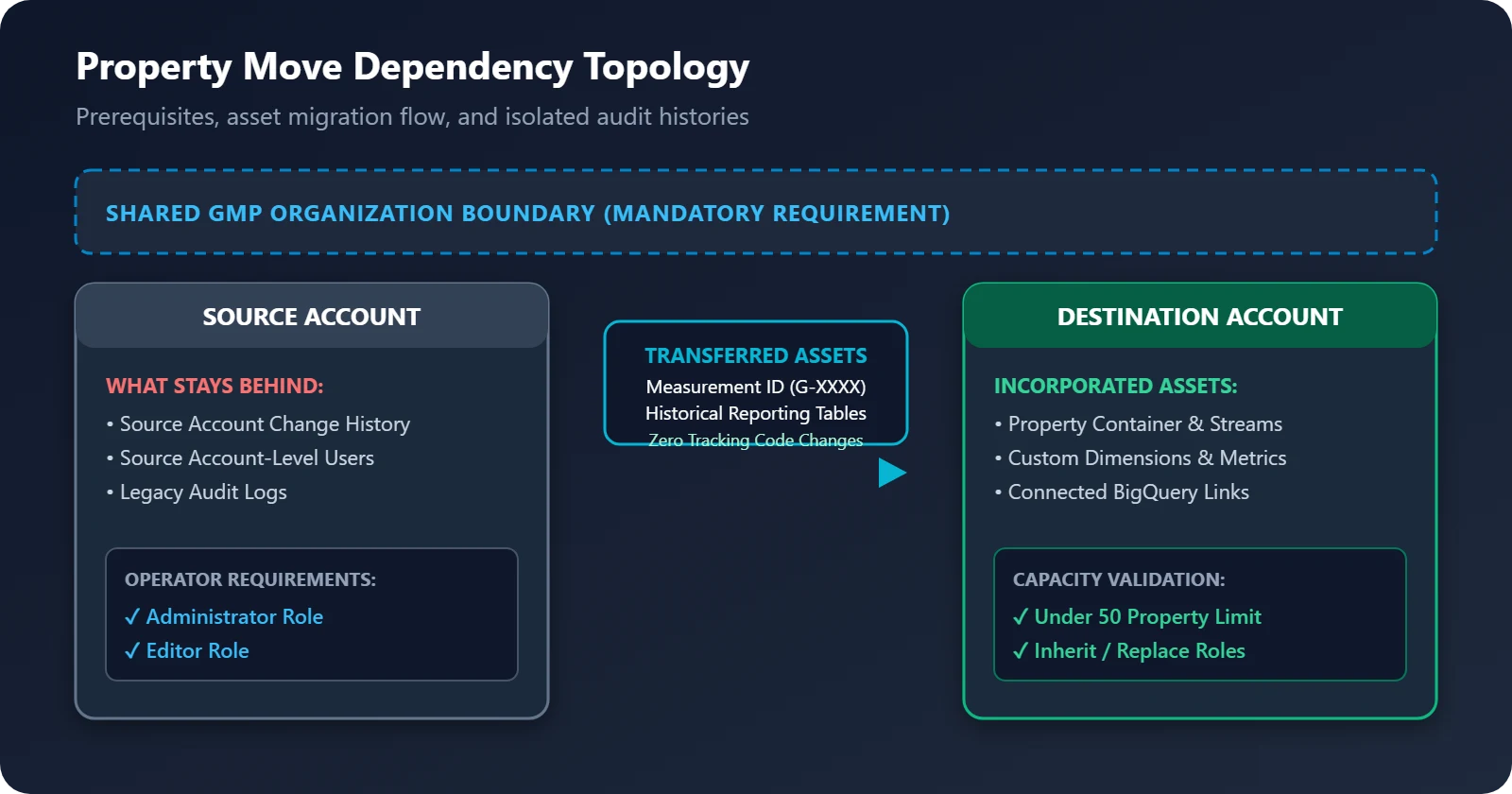
Moving a property solves structural governance problems during agency offboarding or corporate mergers, eliminating the need to modify client-side tag configurations across complex digital estates.
The Permissions Fork: Inheriting Destination Roles vs. Preserving Existing Access
When configuring a property move, the Google Analytics Admin console presents a critical governance decision:
Option A replaces existing property permissions with destination permissions. Choosing this pathway strips all existing property-level user roles and forces the migrated property to inherit the destination account user access list, ensuring former agency staff lose access instantly.
Option B keeps existing property permissions, maintaining existing property-level role delegations while appending destination account administrators during internal reorganizations.
What Stays Behind in the Source Account When Moving a Property?
A property move transfers telemetry, configurations, audiences, and product links, but leaves the Account Change History behind in the source account.
Destination accounts record only administrative modifications executed after the migration timestamp. Export the complete Change History CSV from the source account prior to moving if compliance audits require complete historical records.
Hidden Migration Blockers: GMP Organizations, Ad Manager, and Property Caps
Enterprise migration initiatives stall due to three unverified architectural prerequisites:
Prerequisite 1 mandates a shared Google Marketing Platform organization boundary. Both accounts must link to the exact same GMP Organization before the migration tool activates.
Prerequisite 2 addresses the Google Ad Manager active link lock. Google Analytics strictly blocks moving properties with active Ad Manager links; decouple the link prior to migration and re-establish it in the destination container.
Prerequisite 3 enforces the 50-property quota ceiling. Destination accounts holding 50 properties fail the migration dialog until administrators purge unneeded sandboxes or obtain quota expansions.
The “New Property” Trap: Why Does Creating a Fresh Container Break YoY Reporting?
Creating a fresh GA4 property rather than moving or restructuring an existing container is an expensive enterprise architectural mistake. Google Analytics provides zero native mechanisms to backfill or import historical event tables into a newly initialized property container. A fresh property container resets all baseline metrics to zero, permanently shattering Year-over-Year (YoY) comparative reporting models.
Digital marketing teams discovering this limitation must manually blend disparate data sources in external spreadsheets or Looker Studio calculations, introducing analytical errors and reporting overhead.
Ad algorithmic optimization degrades severely. Pointing paid campaigns at a new property deprives smart bidding strategies of historical conversion baselines, triggering volatile re-calibration phases and inflating cost per acquisition.
Engineers must also recognize the Silent Default Retention Trap. Standard out-of-the-box GA4 property configurations default user and event-level exploratory data retention to just 2 months.
Unless an administrator manually navigates to Admin > Data Settings > Data Retention and elevates the threshold to 14 months, Google Analytics automatically deletes granular user-level historical records after 60 days.
Analytics 360 properties expand this retention window to 26, 38, or 50 months, while standard properties must establish automated daily streaming exports to Google BigQuery under the 1,000,000 daily event quota to secure permanent data longevity.
The Enterprise Pre-Change Checklist: Technology, Data, People, and Process
Modifying or trashing enterprise analytics containers requires systematic operational rigor. Engineering teams should execute changes using the four-pillar governance framework developed through enterprise audit engagements across global markets:
Pillar 1: Technology
Inventory every digital endpoint and platform consuming telemetry from the container, including Google Ads, BigQuery, Search Console, Display & Video 360, and Merchant Center. Inspect tag management infrastructure: locate all client-side GTM containers and Server-Side GTM endpoints dispatching payloads to the target measurement ID, and decouple legacy Universal Analytics migration assistants or Ad Manager links.
Pillar 2: Data
Audit data retention thresholds and warehouse export pipelines, confirming whether the container utilizes 2-month or 14-month settings. For decommissioned properties, configure and verify an export of raw historical schemas into Google BigQuery. Verify record row counts against GA4 UI aggregations, and run formal Data Deletion Requests before executing container actions if removing user data for statutory compliance.
Pillar 3: People
Establish identity governance across administrative roles, confirming that at least two verified internal stakeholders possess Administrator and Editor roles at the parent Account level for rollback authority. Audit inherited permissions across containers, ensuring former agency user accounts are scheduled for access revocation rather than transferred into destination accounts.
Pillar 4: Process
Document a formal change management runbook detailing execution sequence, verification checkpoints, and automated rollback triggers. Schedule container modifications within strict change-freeze windows outside peak marketing events or quarterly financial reporting deadlines. Revert link changes immediately if downstream conversion volume drops below 10% of expected hourly baselines.
Frequently Asked Questions (FAQ)
Can I restore a deleted GA4 property after the 35-day window has expired?
No. Once the 35-day holding period in the Account Trash Can elapses, Google initiates an automated, permanent database purge. At that stage, neither standard support tickets nor Google Marketing Platform enterprise support tiers can recover the property, its configuration settings, or its historical reporting data. To prevent permanent loss, enterprises should configure daily raw event streaming to Google BigQuery, ensuring long-term data warehouse independence from UI container lifecycles.
Why can’t I see the destination account in the dropdown when trying to move a GA4 property?
The destination account dropdown will appear blank or omit your target account if any of four governance prerequisites are violated: (1) You lack both Administrator and Editor permissions on the destination account; (2) The source and destination accounts are tied to different Google Marketing Platform (GMP) organizations; (3) The destination account has reached its 50-property quota ceiling; or (4) The property maintains an active link to Google Ad Manager, which must be unlinked prior to migration.
Does deleting a GA4 property remove the tracking tag from my live website?
No. Deleting a GA4 property inside the Google Analytics Admin console only terminates backend ingestion and reporting infrastructure. Any Google Tag (gtag.js) snippets hardcoded into your website source code or Google Tag Manager (GTM) GA4 Configuration tags will continue firing on user browsers, generating useless 204 network requests that Google servers discard. You must manually pause or remove the tags in GTM or your CMS to keep client-side DOM performance clean.
What happens to Google Ads conversion bidding if a linked GA4 property is moved to the trash?
When a GA4 property is moved to the trash, conversion event syndication to linked Google Ads accounts breaks immediately. Smart Bidding strategies, such as Target CPA and Target ROAS, relying on imported GA4 conversions will experience a sudden signal blackout. Within 24 to 48 hours, campaigns suffer significant bid volatility, budget under-delivery, or misallocated spend. Always repoint or switch bidding goals to native Google Ads conversion tags before trashing an analytics property.
Can I export GA4 historical data to BigQuery after moving a property to the Trash Can?
No. When a property is moved to the Trash Can, all active cloud integrations, including the native BigQuery daily export and streaming export, are suspended immediately. In addition, BigQuery exports do not backfill historical data retroactively. If an enterprise needs to preserve raw event history prior to a planned deletion or account decommissioning, you must link BigQuery, initiate the export, and verify table ingestion in Google Cloud Platform before sending the property to the Trash Can.
Analytics Governance: Moving Beyond Reactive Admin Housekeeping
Container lifecycle actions such as deleting, restoring, and moving properties represent strategic data architecture decisions rather than routine administrative chores. The impulse to declutter an administrative interface must never compromise downstream paid media bidding, enterprise business intelligence stability, or statutory compliance obligations.
Enterprise analytics resilience requires treating tracking tags, measurement properties, and cloud warehouse connections as integrated digital assets. Organizations must implement disciplined access boundaries, maintain automated historical backups in BigQuery, and enforce systematic pre-change verification checklists across every digital property.
When analytics estates expand across regional territories, corporate subsidiaries, and hybrid cloud environments, ad-hoc spreadsheet tracking fails. Collaborating with certified enterprise analytics architects ensures your measurement infrastructure remains secure, compliant, and architecturally resilient.
Explore how an analytics governance and audit engagement with e-CENS protects your digital intelligence, or connect directly with our solutions engineering team to audit your enterprise property architecture today.